 Pixlr AI Photo & Video Editor
Pixlr AI Photo & Video Editor
Enriched Play listing★ 3.8 (1.2M ratings on Google Play)100,000,000+ installs on Google PlayToolsSynced Jul 18, 2026
Pixlr AI Photo & Video Editor (com.pixlr.express) by Pixlr Pte Ltd.
Key facts
- Package name
- com.pixlr.express
- Min Android
- 9
- Updated
- Jul 13, 2026
- Play rating
- 3.8
- Ads
- Yes
- IAP
- Yes
- Content rating
- Everyone
- Genre
- Photography
Publisher description (from Google Play)
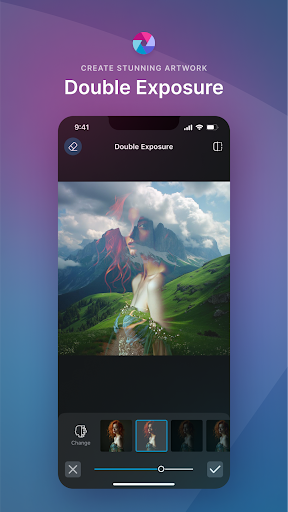
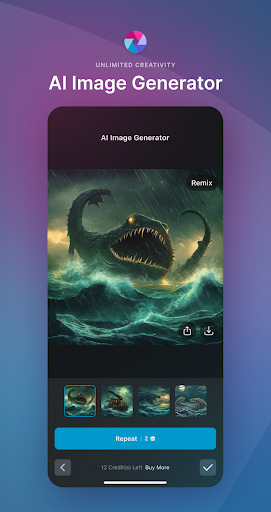
Unleash your creativity with Pixlr AI Art Photo Editor (formerly Pixlr Express) – your go-to free photo editor powered by advanced AI technology. Join over 18 million creators worldwide who trust Pixlr to transform their images with ease and precision. Whether you're a beginner or a seasoned photographer, Pixlr provides an intuitive platform to create stunning visuals with just a few clicks. Capture any moment and let your creativity shine with over 2 million combinations of FREE effects, overlays, and filters. Seamlessly share your photos with friends or followers through email, Instagram, Facebook, TikTok, or any other social network. New AI-Powered Features AI Generative Fill – Highlight any area in your photo and watch as Pixlr's AI-powered generator seamlessly fills it with objects. AI Remove Object – Effortlessly remove any object from your image, and let our AI intelligently fill in the blanks. AI Remove Background – Enjoy pixel-perfect background removal, thanks to our cutting-edge AI editor. Comprehensive Photo Editing Features Explore seasonally updated multi-layered Social Media templates designed to elevate your digital content. Create stunning photo collages effortlessly with a variety of preset collage designs, grid styles, customized ratios, and backgrounds. Instantly adjust the color of your photos in one click using Auto Fix, making your images pop with vibrant hues. Experiment with Double Exposure to create breathtaking effects using layers and adjustable transparency. Add artistic flair to your images with Stylize effects like pencil sketch, poster, watercolor, and more. Remove blemishes, red-eye, smoothen skin, or whiten teeth effortlessly with simple and precise tools. Highlight specific colors in your photo using the Color Splash effect, or create depth with Focal Blur. Choose from a wide range of effect packs to give your photos the look and feel you desire. Adjust the tone of your photos using overlays – amplify, cool down, or add surreal shades to your images. Easily add text to your photos with a variety of fonts, ensuring your message stands out. Complete your editing with the perfect border – select a style that complements your photo. Keep your content fresh with our growing library of additional effects, overlays, and border packs. Save time by keeping track of your favorite effects and overlays with the convenient Favorites button. Quickly crop and resize images to your desired dimensions before saving and sharing
Listing classification
Play genre: Photography. Content rating: Everyone.
Background and observed updates
Release information
Google Play lists a release date of Nov 14, 2012 for com.pixlr.express.
Recent Play Store update
Play updated this listing on 2026-07-13. What’s New 🎉 • ✨ New Select Tool with improved controls • âœ‚ï¸ Crop videos and image overlays • 🎨 New fonts in video editor • 🌈 Image filters in video editor • 🎬 Animations for videos, images & stickers • 🞠Bug fixes & performance improvements
Observed version timeline
2 observations recorded for com.pixlr.express.
Version snapshots are not in the catalog yet. Confirm the current listing on Google Play.
Install paths
Confirm identity on Google Play
Open Pixlr AI Photo & Video Editor on Google Play. Confirm package com.pixlr.express and developer Pixlr Pte Ltd before installing.
Open the Google Play listing to confirm the current version and size.
APK Download does not host APK files. Install from the official Google Play listing when it is available.
Screenshots
Preview images from the Google Play listing.






Alternatives preview
Same-category apps from the catalog. Full comparison lands on the alternatives page.


Safety signals
Publisher: Pixlr Pte Ltd. Package: com.pixlr.express. Play content rating: Everyone. Play listing flags ads. Publisher privacy policy linked from the Play listing.
FAQ
Does Pixlr AI Photo & Video Editor contain ads?
The Google Play listing flags ads (checked Jul 13, 2026).
Does Pixlr AI Photo & Video Editor offer in-app purchases?
The Google Play listing indicates in-app purchases may be offered (checked Jul 13, 2026).
What Android version does Pixlr AI Photo & Video Editor need?
Android 9 or later, per the listing observed Jul 13, 2026.
What is the content rating for Pixlr AI Photo & Video Editor?
Google Play lists the content rating as Everyone (checked Jul 13, 2026).
What is the Google Play rating for Pixlr AI Photo & Video Editor?
3.8/5 from 1.2M ratings on Google Play (checked Jul 13, 2026).
What is the package name for Pixlr AI Photo & Video Editor?
The Android package name is com.pixlr.express.